
This first example is a puzzle, taken from the LinkedIn Queens game. It has a clean answer, no business judgment, and is small enough that you can verify the result by hand. It exercises the full Feasible loop — understanding → modeling → solving → explaining.Documentation Index
Fetch the complete documentation index at: https://feasible-1447f9c5.mintlify.app/llms.txt
Use this file to discover all available pages before exploring further.
The puzzle
A 7×7 board is divided into 7 colored regions. Place exactly one queen in each row, each column, and each region. No two queens may touch — not even diagonally adjacent.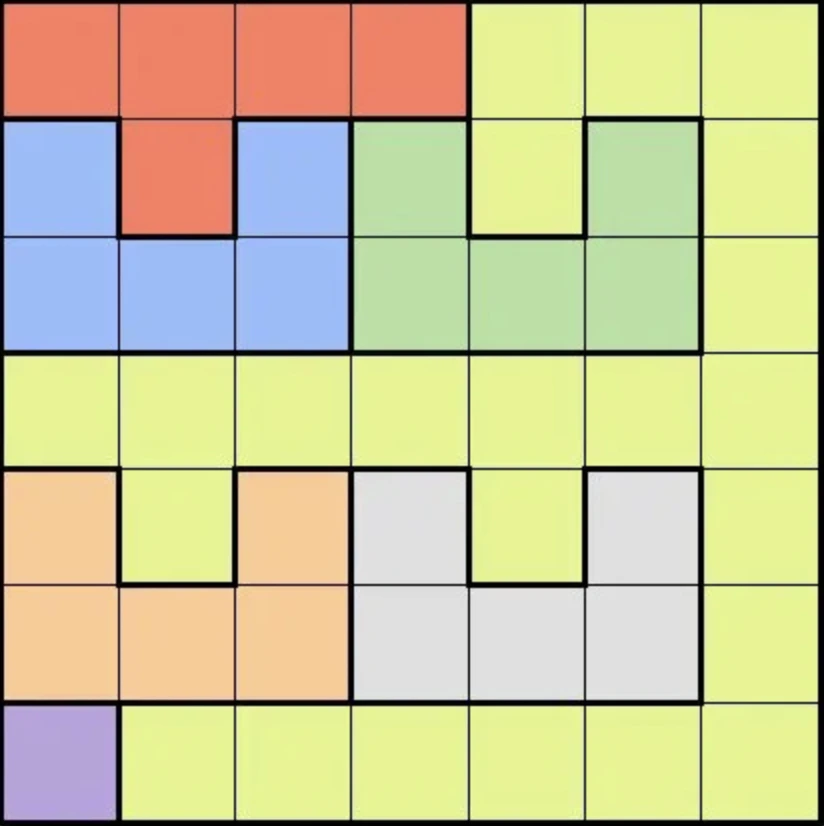
What you do
In this case, we need to transform the image into a text description first. This is because, while some LLMs are multimodal and can read images, they are not reliable for extracting structured data from images. Instead, we can use the following description of the board:Problem statement
Example completed workflow: Open in Feasible
What happens
You will see, in real time:- Classification. Feasible decides this is a constraint-satisfaction problem solvable as an integer program.
- Standard form. The agent extracts:
- Decision variables: a binary variable
x_{r,c}for each cell — 1 if a queen is placed there, 0 otherwise. - Constraints: one queen per row, one per column, one per color region; pairs of adjacent cells (including diagonals) cannot both be 1.
- Objective: a dummy objective like
min 0or similar.
- Decision variables: a binary variable
- Solver run. The agent picks an appropriate solver and submits the formulation.
- Answer. A grid showing where each queen goes, plus a sentence explaining the placement.
- Self-evaluation. Feasible re-checks the placement against the rules.
What to look at in the UI
The frontend has live panels showing the model state as it gets built:- The Variables panel fills in as the agent generates them.
- The Constraints panel does the same. You can read most constraints in human-readable form (“Exactly one queen in row 3”), but it might be skipped for repetitive constraints like no adjacent placements.
- The Solver result panel shows the status (
OPTIMAL, objective value). - The Answer panel renders the agent’s plain-language explanation.
- The Evaluation panel shows whether Feasible thinks its own answer is right and how confident it is.
Learnings from this example
- It shows the full pipeline working on a verifiable problem.
- This is a feasibility problem, where the aim is to find any solution that does not violate any constraints. The agent typically handles this with the objective
minimize 0, but other ways (e.g. maximizing the number of queens to place) are possible. - There are different ways of encoding the “no 2 queens may touch each other” constraint:
- Create pairwise constraints of the form
x_1_1 + x_1_2 <= 1for all pairs of adjacent cells - Create constraints for each 2-by-2 square of the form
x_1_1 + x_1_2 + x_2_1 + x_2_2 <= 1
- Create pairwise constraints of the form
- It is a good place to experiment with provider switching. Re-run with a different worker provider and watch how the formulation differs.